

Purplish 1.3 shipped today. Before it did, I wanted to know if Purplish works on the theme your store already runs.
I build and test every Purplish block on Purple, WooCommerce's default block theme. That only shows it works on Purple, and a lot of stores run Astra, Blocksy or Storefront. Peter J Walsh asked me on X if Purplish works with Blocksy, and I had to say I hadn't fully tested it.
So I tested it on 11 themes, found four bugs, and fixed all four before 1.3 shipped.
TLDR
I tested Purplish 1.3 on 11 WooCommerce themes. The test found four bugs: unreadable tints in dark styles, gallery options that did nothing on Blocksy, a gallery hover bug from 1.0, and a one-column grid on phones. All four are fixed in 1.3. A few theme quirks remain.
On this page
The 11 themes
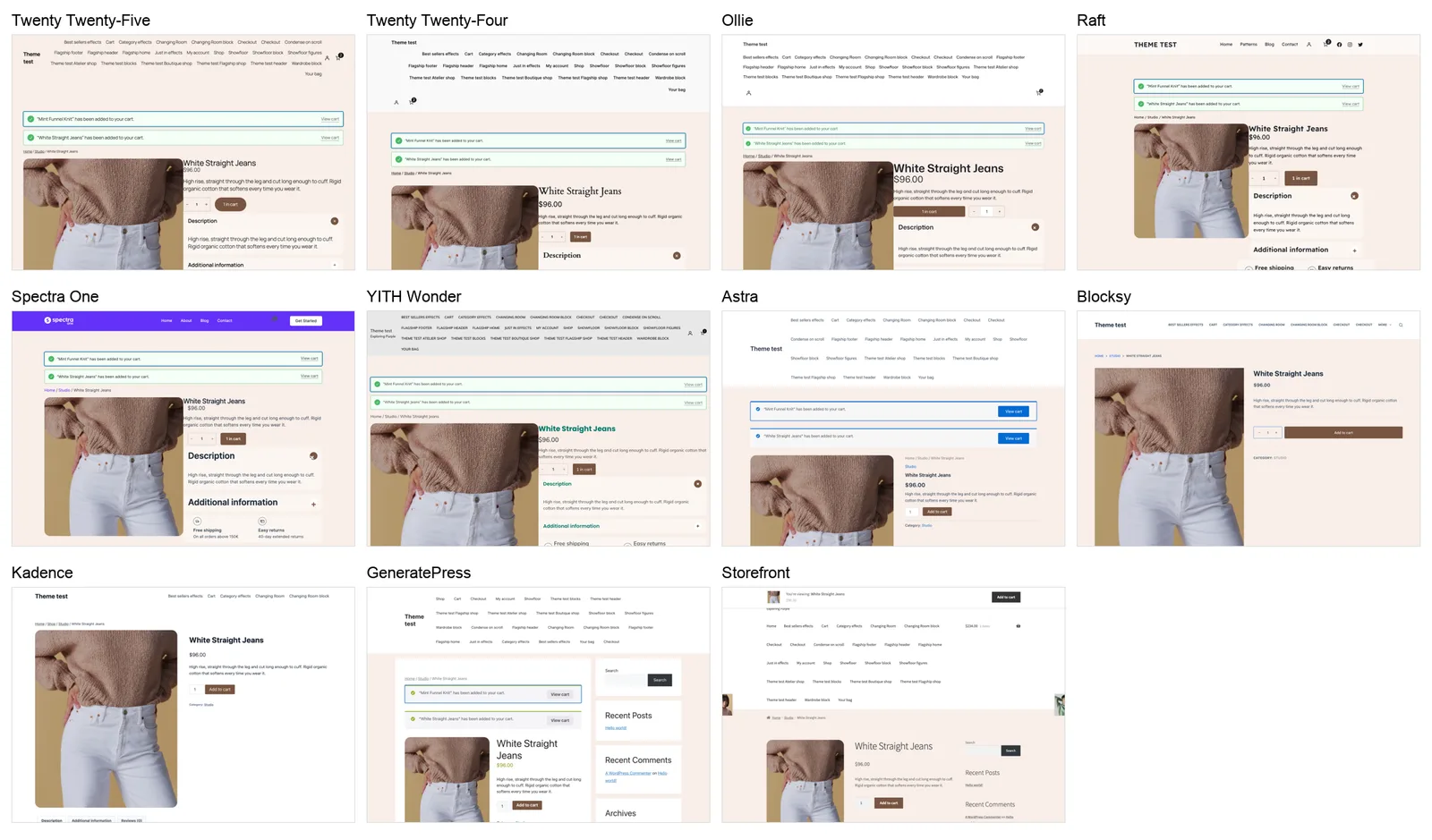
On the block theme side, I used Twenty Twenty-Five, Twenty Twenty-Four, Ollie, Raft, Spectra One and YITH Wonder.
For classic themes, the ones built with PHP templates, I picked Astra, Blocksy, Kadence, GeneratePress and Storefront.
The classic themes worried me more. Purplish adds its options to WooCommerce's blocks, and a classic theme builds its store pages with PHP templates instead. I wanted to see whether those options still showed up.
How I tested
I set up a separate local test site with WordPress 7.1, WooCommerce 11.3 and the Purplish 1.3 code, then went through the themes one by one.
On every theme I checked the same 14 pages: simple and variable product pages, the shop page, two shop category layouts, the card effects grid, the Flagship home page, a page with every Purplish block, the header with the Mini-Cart drawer open, Wardrobe, Showfloor, Changing Room, Cart and Checkout.
Each page got a desktop view at 1440px and a phone view at 390px with touch. Five pages also got a right-to-left language, and seven got the dark style on Twenty Twenty-Five, Twenty Twenty-Four, Raft and Spectra One. I saved a screenshot of every view, 646 in all, so I could put the themes side by side.
On every page I watched the browser console, failed network requests, the WordPress debug log and sideways scroll. I also compared the Purplish classes on each page with Twenty Twenty-Five, so an option that never reached a theme would show up as a missing class. On the block themes, I went through 13 Site Editor views each and looked for block warnings.
The console and network requests stayed clean on every theme, the debug log stayed empty, and the Site Editor showed no warnings. Every block option rendered on all five classic themes. The real problems showed up in the screenshots.
Tints washed out in dark styles
The first thing I noticed was the product page in Twenty Twenty-Five's Evening style. The page tint stayed a light peach, but the theme had switched its text to a light color. The title, price and description almost disappeared.

The Cart page did the same with Soft rows turned on. The rows stayed white while the text turned light.
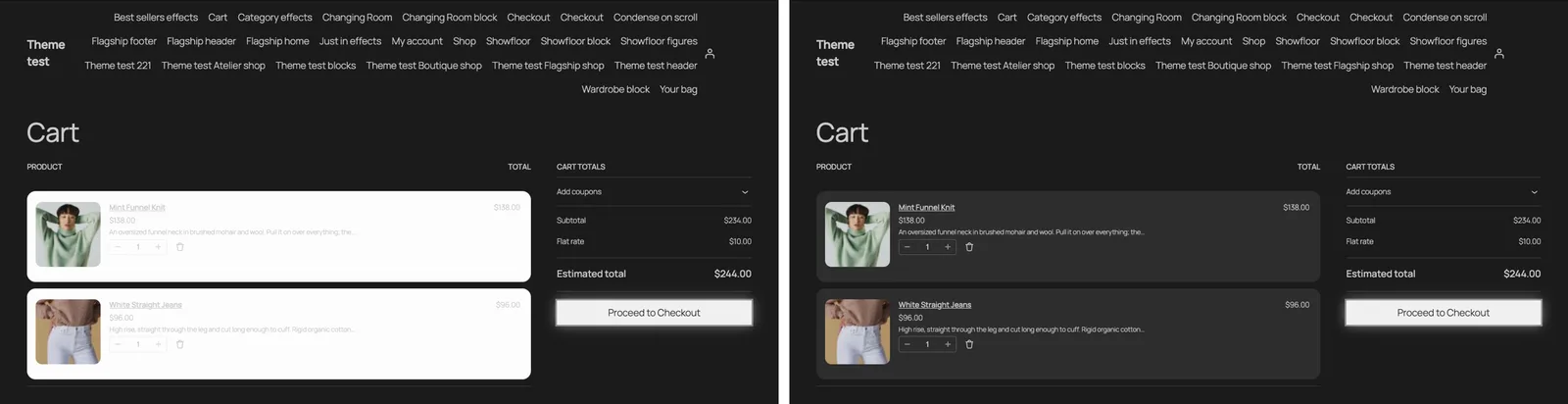
It wasn't one theme. Twenty Twenty-Four's Onyx, Raft's Night Owl and Spectra One's dark style all broke the same way. Flagship's Best sellers band had a smaller version of it, with product titles fading into its light lavender background.
The cause was in my CSS. Purplish's soft color always mixed toward white, and the tint and row rules set a background without setting a text color. On a light theme that never shows, because dark text on a pale fill reads fine. In a dark style, the theme's light text landed on my pale fill.
So Purplish now reads the page background from the theme's styles, including the active style variation. When that background is dark, the tint becomes the page color lifted a little toward the product's color, soft fills mix toward the page instead of white, and the sale price gets lighter instead of darker.
The Best sellers, Just in and newsletter bands now set their own text color. Light themes and classic themes look exactly as before. I ran all four dark styles again after the fix (#221).
The tint and Cart row fixes reach existing pages right away. If you already placed Best sellers or Just in on a page, insert the pattern again to get the readable titles.
Gallery options did nothing on Blocksy
This was Peter's Blocksy question, and it turned out to be a real bug. With Rounded corners, Hide thumbnails and a hover look turned on, Astra showed a rounded photo. Blocksy showed a square one with thumbnails and no hover.
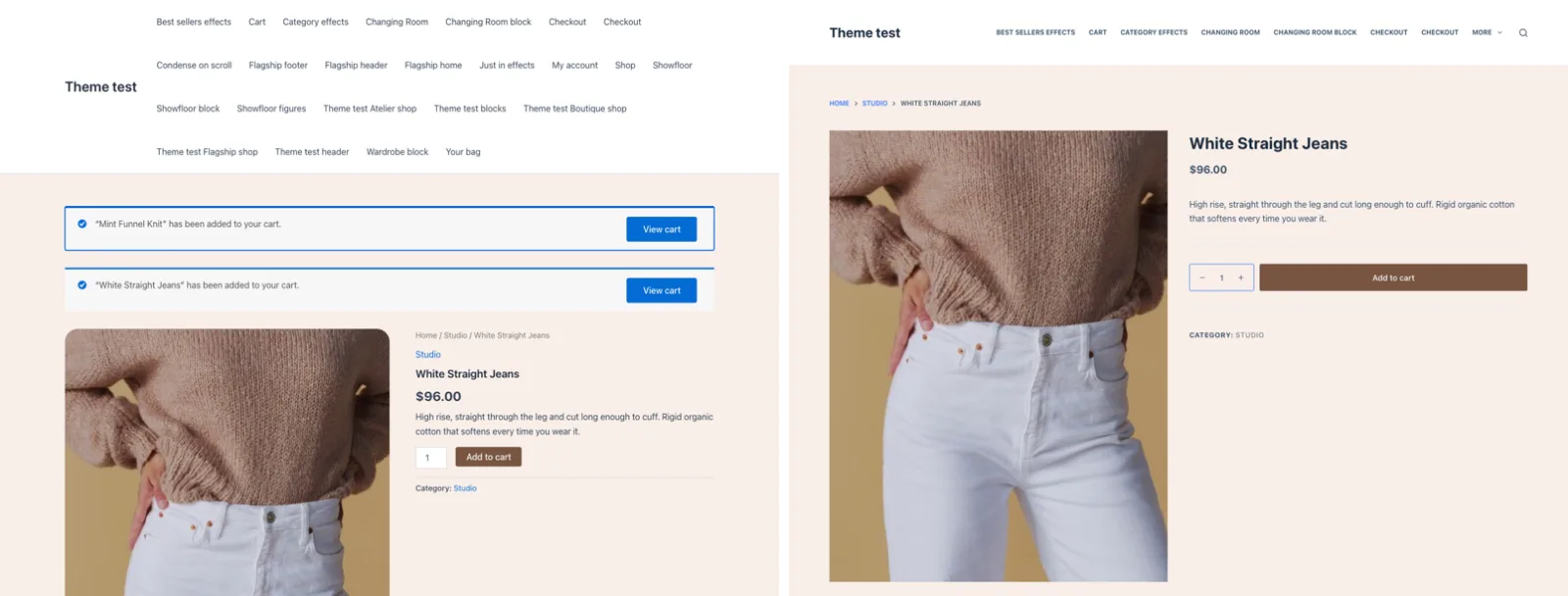
I inspected the page and found the reason. Blocksy replaces WooCommerce's product gallery with its own slider. Purplish looked for WooCommerce's gallery parts, .flex-viewport, .woocommerce-product-gallery__wrapper and .flex-control-thumbs, and none of them exist on Blocksy. Its gallery sits in .ct-product-gallery-container instead.
Purplish now finds Blocksy's slider frame, its thumbnails and its single photo layout too. Rounded corners, hidden thumbnails and every hover look work on Blocksy, and themes that keep WooCommerce's gallery work as before (#222).
An older gallery bug, there since 1.0
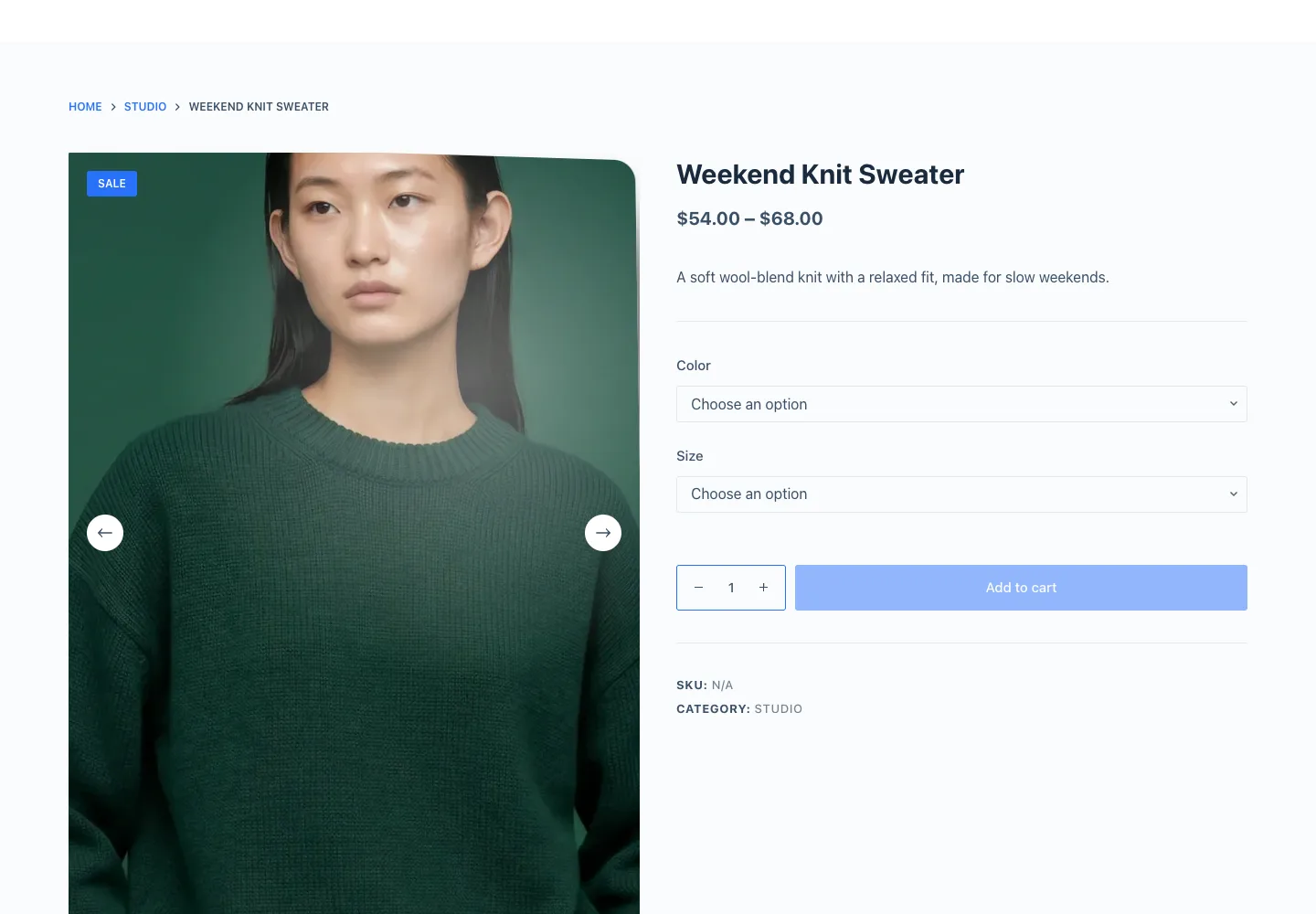
While fixing Blocksy, I also checked what Purplish picks as the hover target on Astra. It was wrong, and it had been wrong since 1.0.
Purplish picks the hover target when the page finishes loading. It looks for WooCommerce's photo frame first and falls back to the gallery wrapper.
WooCommerce's slider builds that frame after the page loads, though. On a product with two gallery photos, there was no frame at load, and two seconds later there was. So the fallback always won, and the hover target was the 2400px sliding strip instead of the 600px photo frame. The tilt, zoom and loupe measured the mouse against the wrong box.
That hit every classic theme that keeps WooCommerce's gallery: Astra, Storefront, Kadence and GeneratePress. Purplish now waits for the photo frame when a product has more than one photo, and uses the wrapper only when there's a single photo and no slider. I checked it on Astra, Storefront and Blocksy (#228).
The category grid dropped to one column on phones
On Blocksy at 390px, Flagship's Shop by category stacked into one tall column.
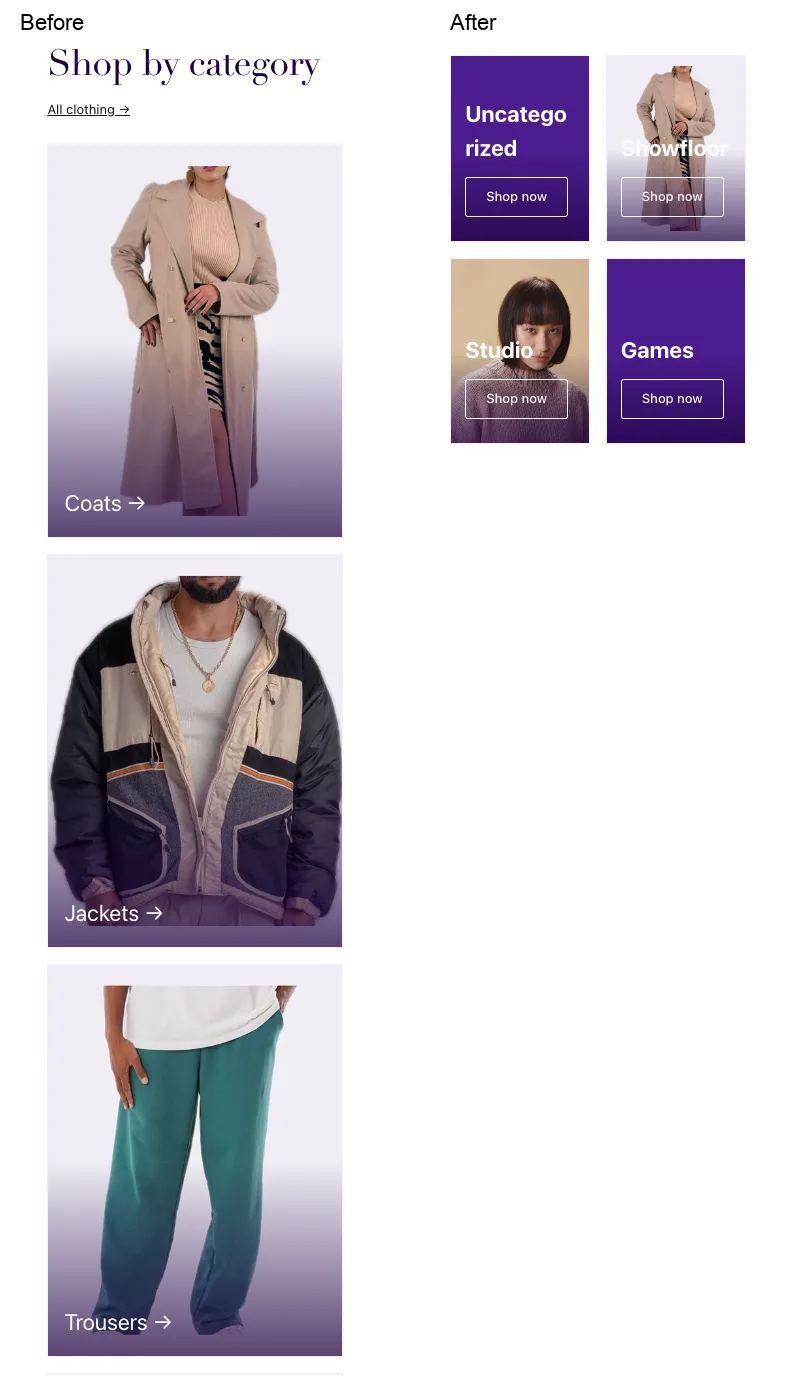
I measured the grid in the browser. Each column needs at least 9rem, so two columns and the gap need about 304px. Blocksy's side padding leaves about 295px on a 390px phone. That's about nine pixels short, so the grid fell back to one column.
While I was in there, I saw a second problem. Between phone and desktop widths, the grid often showed three columns, which left the fourth tile alone on its own row.
The grid now shows two columns or four, never three. It drops to one column only when two would break the category names, and it ignores the list indent Storefront adds. The change applies when you insert the pattern, so a page that already has it keeps the old grid (#223).
What depends on your theme
Some things I saw weren't Purplish bugs. They come from how each theme works, and they're worth knowing before you pick one.
- Classic themes build the shop page with their own PHP template, so Purplish's shop patterns don't apply there. Everything else on a classic theme works.
- On classic themes, the Flagship header and footer patterns sit in your page content. They don't replace the theme's header.
- Theme button and link colors win over block colors on Astra, YITH Wonder and the other classic themes. Astra even turns the Mini-Cart button blue.
- YITH Wonder writes the Cart block into its own Cart template, so options set on the Cart page never show. Set them on the Page: Cart template in the Site Editor.
- Storefront sets
overflow-x: hiddenon its page wrapper, so nothing inside can stick. Scroll Lookbook falls back to its stacked layout there. - On GeneratePress and Storefront, the sidebar narrows content to 820px or less, so Runway uses its narrow layout even on a desktop.
- Raft scrolls sideways by 48px on a desktop when a full-width Cover sits inside a full-width Group. Raft's own CSS pulls the inner block out twice.
So, does Purplish work with any theme?
On these 11, yes. With 1.3, every Purplish block option renders on all of them, block and classic, on desktop and phone, apart from the theme quirks above. Right-to-left passed on every theme, and all four dark styles I ran now read clearly.
I can't promise every theme. One that replaces WooCommerce's gallery the way Blocksy does, or writes blocks into its own templates the way YITH Wonder does, can still surprise me.
Everything else that shipped in 1.3 is in the Purplish 1.3 release post.
If your theme isn't on this list, or something looks off on it, leave a comment with the theme name and the page. I'll run it through the same test and add the results here.
Thank you to Peter for asking about Blocksy. His question started this test, and the test turned up a bug that had been in Purplish since 1.0.

Leave a question or note