
Filters and a cart count that match your store.
Purplish makes the active filters on your shop page look like your chips, and makes the mini-cart answer each add to cart: the count pops, or the product photo flies in. Each is a switch in the block sidebar.
Free and open source. Updated for Purplish 1.3.3.

A switch or two in each block's sidebar.
Select Product Filters or the Mini-Cart in the Site Editor, and the switches are in the Purplish panel.
- Select the block
Product Filters on the shop template, or the Mini-Cart in your header.
- Open the Purplish panel
Turn on Matching chips, Count pop or Fly to cart.
- Save the template
The setting is saved on the block in that template or template part.
Both need a block theme. The classic theme settings don't include these blocks.
New in Purplish 1.3: Product Filters can sit in a bar above the products and open on hover, a Hide filters button can fold the sidebar away, and color swatches can show their names. They're on the Shop pages page.
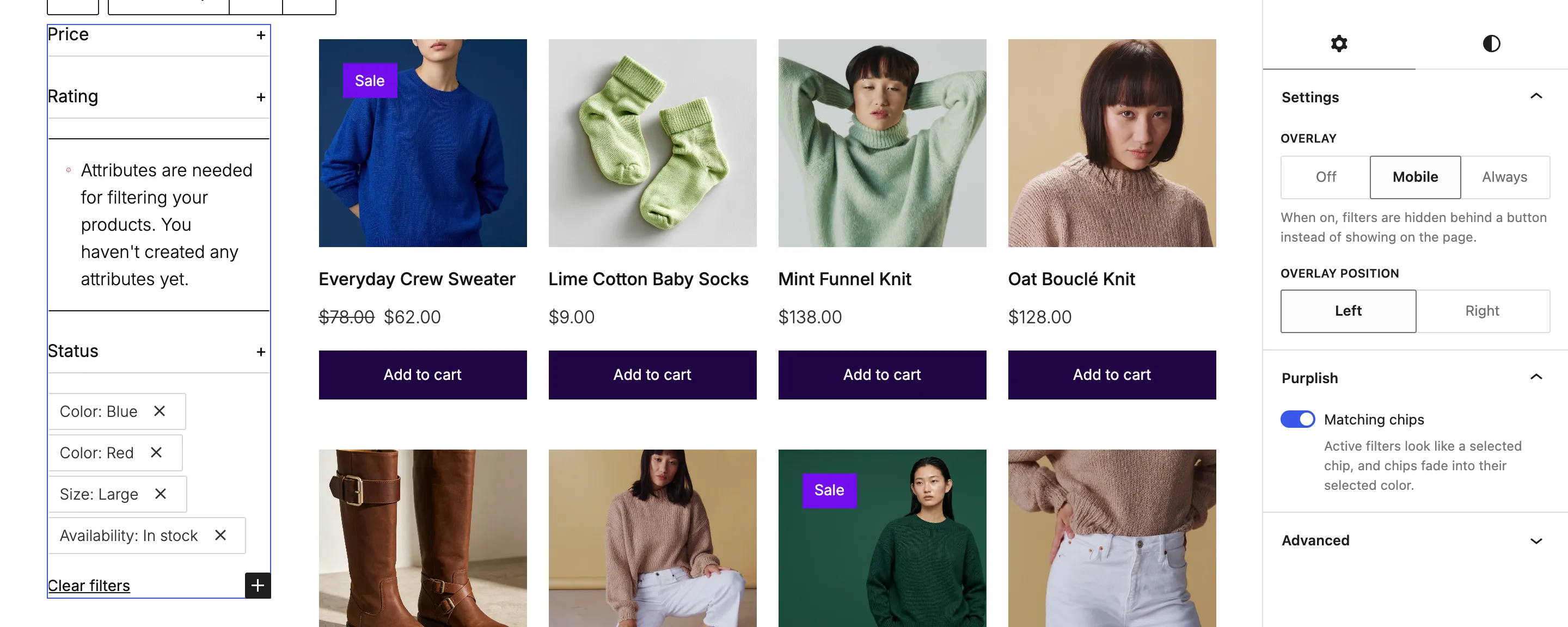
Active filters that look like your chips.
On the shop page, Product Filters shows each active filter as a chip. Turn on Matching chips, and they take the look of a selected chip in your store.
- Matching chips
- The active filters get the selected chip's colors, corners and letter case, and a chip fades into its selected color when picked.
- Tap size
- New in 1.3.2. Chips and the button that opens the filters on phones are at least 44px tall, easy to hit with a thumb.


A mini-cart that answers the button.
A shopper presses add to cart, and the mini-cart in your header shows it right away. Press the button to try it.
- Count pop
- The item count pops with a ring in its own color, and the bag gives a small turn, each time something goes into the cart.
- Fly to cart
- New in Purplish 1.2. The product photo flies into the cart icon when a shopper adds it, from product cards and the product page.
- Free shipping meter
- New in 1.3.2. On the drawer's Mini-Cart Contents block. A line and a bar above the subtotal show how much more the cart needs for free shipping, then say "Your order ships free." It needs a Free shipping method with a minimum order amount in the shopper's shipping zone. New in 1.3.3, the line uses your method's name, such as "Spend $12.00 more for Free UK delivery.", and Meter text and Text once it ships free take your own words.
- Hide short descriptions
- New in 1.3.2. Also on Mini-Cart Contents. Each item shows its name, price and quantity without the short description. Variation details such as color and size stay.
Turn them on in the Purplish panel of the Mini-Cart block. Fly to cart sits out when the drawer opens on add, since the drawer covers the icon.

A Mini-Cart block with Count pop on, running Purplish's own stylesheet and script. The button only counts up.
Good to know before you turn them on.
Where these work, and what they load.
- Block themes only
These switches live on blocks in the Site Editor, so they need a block theme.
- Reduced motion
Visitors who ask their device for reduced motion get the matching chips without the fade, a count that changes without the pop, and no flight to the cart.
- Loads only where it's used
Each effect loads only on pages that use it. A header mini-cart is on every page, so Count pop or Fly to cart there loads the effects on every page.
- Nothing gets replaced
Purplish styles WooCommerce's own blocks. Deactivate it, and they look exactly as they did before.
More of Purplish
- Product cardsTwenty-three card effects and add to cart on the photo for the shop page.
- Sale badge and sold-out optionsPill, circle or price tag badges, and sold-out options crossed out or blurred.
- Button effectsGlow, glass, a spectrum ring and googly eyes for any Button block and the add to cart button.
- Product page colorsThe button, the selected option and the sale badge follow the color the shopper picks.
- Cart and checkoutLooks for the cart, the checkout, the Mini-Cart drawer and the thank-you page.
- EscalatorProduct photos ride up and down in columns, and shoppers add to cart from the photo.
Filter and cart questions.
What store owners ask about these two switches. The docs cover every option.
What does Matching chips change?
The active filter chips in Product Filters. They take the colors, corners and letter case of a selected chip in the same block, so the filters a shopper has on look like the chips they picked.
How do I animate the WooCommerce mini-cart count?
On a block theme, select the Mini-Cart block, usually in your header template part, and turn on Count pop in its Purplish panel. The count pops each time something goes in the cart.
Does Count pop load on every page?
If the Mini-Cart is in your header, yes. Purplish loads its effects only on pages that use them, and a header mini-cart is on every page.
Make the filters and the cart feel like your store.
Turn on Matching chips and Count pop in the blocks you already have.
Block themes. Free and open source.