
Where to find it
Edit the Checkout page in Pages, or open Appearance, Editor, Templates, Page: Checkout. Select the Checkout block, then pick Step numbers in the Purplish panel. You'll see it in the editor as you pick.

Step numbers sits under Shipping and payment choices.
The choices
It starts on None.
| Choice | What it does |
|---|---|
| None Default | Keeps WooCommerce's own step numbers, if they're on. |
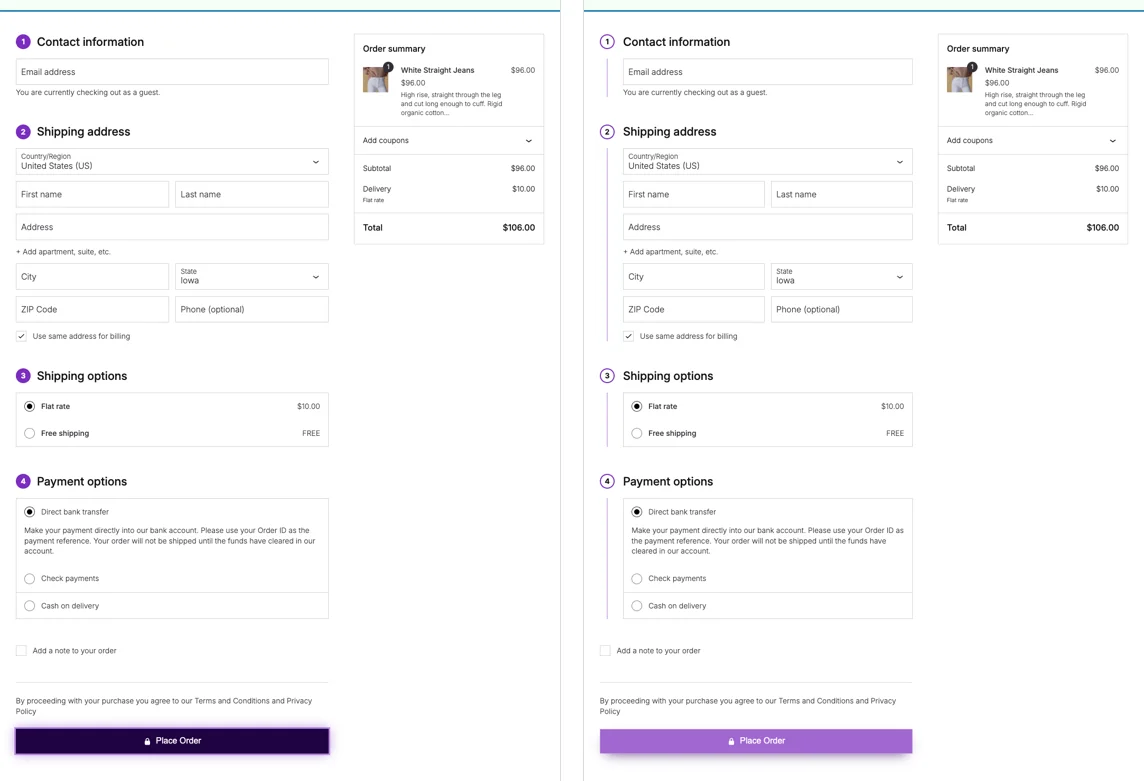
| Badges | Puts each section's number in a circle of the effect color. |
| Timeline | Puts each number in a ring beside the section, with a line in the effect color down the side of its fields. |
See both
Badges, then Timeline, on the demo store checkout.
Good to know
Before you pick one
- There's no need to turn on WooCommerce's own step numbers. If they're on, these take their place.
- Only sections with a title get a number, so the order note doesn't.